
1. What is a Form 8949 Statement?
2. What is an "Intelligent" Form 8949 Statement?
3. What are the advantages of Intelligent Form 8949 Statements?
4. What does a tax software application need to do to ingest Intelligent Form 8949 Statements?
Example Statement
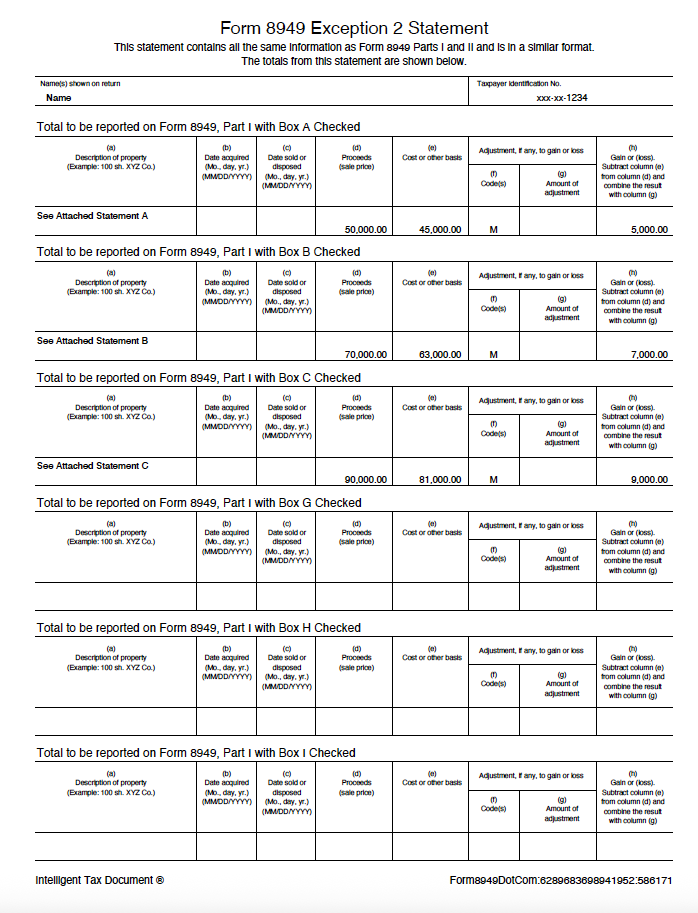
1. What is a Form 8949 Statement?
Form 8949 Statements are also known as Form 8949 Exception 2 Statements.
The IRS instructions describe "Exception 2" as follows:
Instead of reporting each of your transactions on a separate row of Form 8949 Part I or II,
you can report them on an attached statement
containing all the same information as Parts I and II and in a similar format.
Example Statement
2. What is an Intelligent Form 8949 Statement?
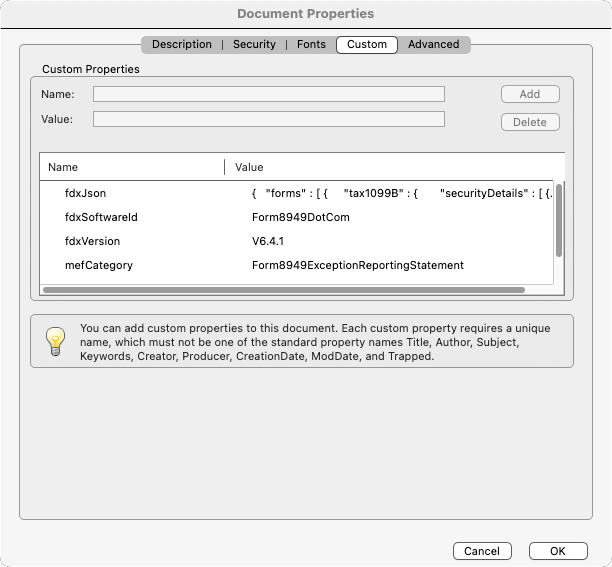
"Intelligent" Form 8949 Statements include the statement data in the document properties in industry-standard JSON (Java Script Object Notation) format.
Example Custom Document Properties
3. What are the advantages of Intelligent Form 8949 Statements?
-
Reduces capital gain and loss reporting to ONE USER ACTION: Just upload the statement.
- Tax software reads the embedded summary transactions and reports them on Form 8949.
- Tax software attaches the PDF file to the electronically-filed return.
- Overcomes number of transaction limits.
- Avoids rounding errors.
4. What does a tax software application need to do to ingest Intelligent Form 8949 Statements?
1) Inspect document properties. See explanation and more technical details.
Example Custom Document Properties
2) Make note of 'mefCategory' property. Treat PDF file as uploaded for e-file attachment.
3) Extract 'fdxJson' property value.
Example fdxJson value (FDX V6.4.1)
{
  "forms": [
    {
      "tax1099B": {
        "securityDetails": [
          {
            "checkboxOnForm8949": "A",
            "saleDescription": "See Attached Statement A",
            "variousDatesAcquired": true,
            "dateOfSale": "2025-12-31",
            "salesPrice": 10000.00,
            "adjustmentCodes": [
              {
                "code": "M"
              }
            ],
            "costBasis": 9000.00
          },
          {
            "checkboxOnForm8949": "B",
            "saleDescription": "See Attached Statement B",
            "variousDatesAcquired": true,
            "dateOfSale": "2025-12-31",
            "salesPrice": 20000.00,
            "adjustmentCodes": [
              {
                "code": "M"
              }
            ],
            "costBasis": 18000.00
          },
          {
            "checkboxOnForm8949": "C",
            "saleDescription": "See Attached Statement C",
            "variousDatesAcquired": true,
            "dateOfSale": "2025-12-31",
            "salesPrice": 30000.00,
            "adjustmentCodes": [
              {
                "code": "M"
              }
            ],
            "costBasis": 27000.00
          },
          {
            "checkboxOnForm8949": "D",
            "saleDescription": "See Attached Statement D",
            "variousDatesAcquired": true,
            "dateOfSale": "2025-12-31",
            "salesPrice": 40000.00,
            "adjustmentCodes": [
              {
                "code": "M"
              }
            ],
            "costBasis": 36000.00
          },
          {
            "checkboxOnForm8949": "E",
            "saleDescription": "See Attached Statement E",
            "variousDatesAcquired": true,
            "dateOfSale": "2025-12-31",
            "salesPrice": 50000.00,
            "adjustmentCodes": [
              {
                "code": "M"
              }
            ],
            "costBasis": 45000.00
          },
          {
            "checkboxOnForm8949": "F",
            "saleDescription": "See Attached Statement F",
            "variousDatesAcquired": true,
            "dateOfSale": "2025-12-31",
            "salesPrice": 60000.00,
            "adjustmentCodes": [
              {
                "code": "M"
              }
            ],
            "costBasis": 54000.00
          }
        ]
      },
      "tax1099Da": {
        "digitalAssetDetails": [
          {
            "checkboxOnForm8949": "G",
            "digitalAssetName": "See Attached Statement G",
            "variousDatesAcquired": true,
            "dateOfSale": "2025-12-31",
            "proceeds": 70000.00,
            "costBasis": 63000.00,
            "basisReported": true,
            "longOrShort": "SHORT"
          },
          {
            "checkboxOnForm8949": "H",
            "digitalAssetName": "See Attached Statement H",
            "variousDatesAcquired": true,
            "dateOfSale": "2025-12-31",
            "proceeds": 80000.00,
            "costBasis": 72000.00,
            "basisReported": false,
            "longOrShort": "SHORT"
          },
          {
            "checkboxOnForm8949": "I",
            "digitalAssetName": "See Attached Statement I",
            "variousDatesAcquired": true,
            "dateOfSale": "2025-12-31",
            "proceeds": 90000.00,
            "costBasis": 81000.00,
            "basisReported": false,
            "longOrShort": "SHORT"
          },
          {
            "checkboxOnForm8949": "J",
            "digitalAssetName": "See Attached Statement J",
            "variousDatesAcquired": true,
            "dateOfSale": "2025-12-31",
            "proceeds": 100000.00,
            "costBasis": 90000.00,
            "basisReported": true,
            "longOrShort": "LONG"
          },
          {
            "checkboxOnForm8949": "K",
            "digitalAssetName": "See Attached Statement K",
            "variousDatesAcquired": true,
            "dateOfSale": "2025-12-31",
            "proceeds": 110000.00,
            "costBasis": 99000.00,
            "basisReported": false,
            "longOrShort": "LONG"
          },
          {
            "checkboxOnForm8949": "L",
            "digitalAssetName": "See Attached Statement L",
            "variousDatesAcquired": true,
            "dateOfSale": "2025-12-31",
            "proceeds": 120000.00,
            "costBasis": 108000.00,
            "basisReported": false,
            "longOrShort": "LONG"
          }
        ]
      }
    }
  ],
  "attributes": []
}
4) Deserialize JSON.
5) Add deserialized 'See Attached' transactions to the tax return.
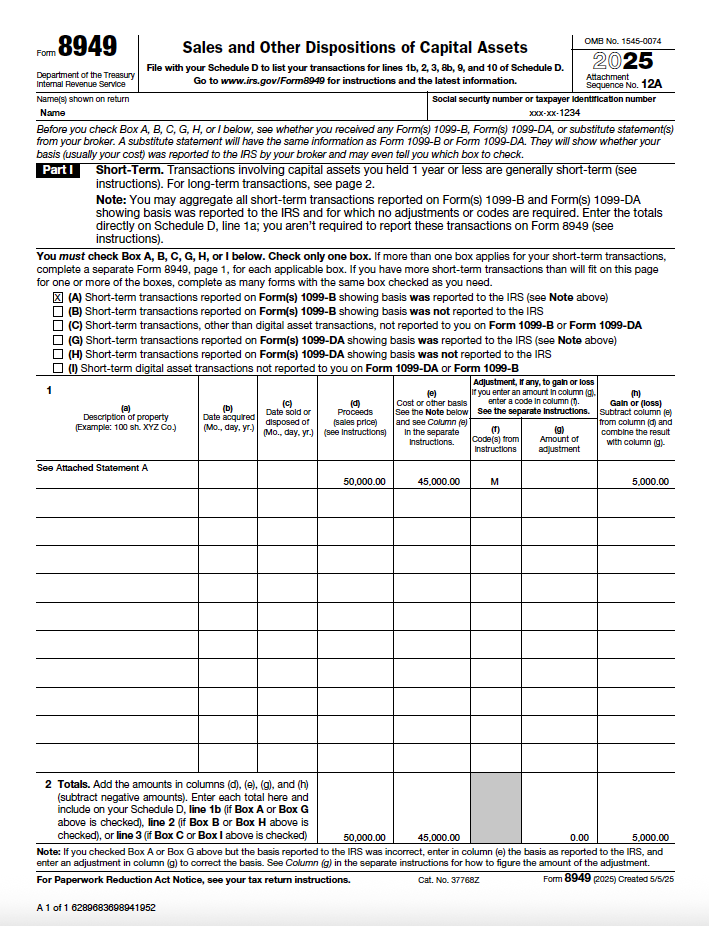
In the case of Form 8949 Statements the embedded data consists of the "summary transactions" that should be reported on Form 8949 with code "M" referencing the attached statement. Note: V6.4.1 does not include adjustmentCodes property for DigitalAssetDetails. Code M adjustment code needs to be inferred.
Example Form 8949
Contact us at support@form8949.com for more information.